Sunday, August 26, 2012

Control PDF Layers

Control PDF Layers

The ability to have control over layers while in a PDF is a cool/useful feature but there are times when you might not want to include them. Here’s how to turn OFF (or on) layers when creating PDFs.
(Below is an example of a PDF with Layers)
When the Plot dialog box is open: Select the “DWG To PDF.pc3″ plotter and then click the “Properties” button that is next to where you selected the plotter.
  • Click the “Device and Settings” tab
  • Select “Custom Properties”
  • Click the “Customize Properties” button at the bottom
  • Uncheck the box next to “Incude layer Information”
  • Click OK
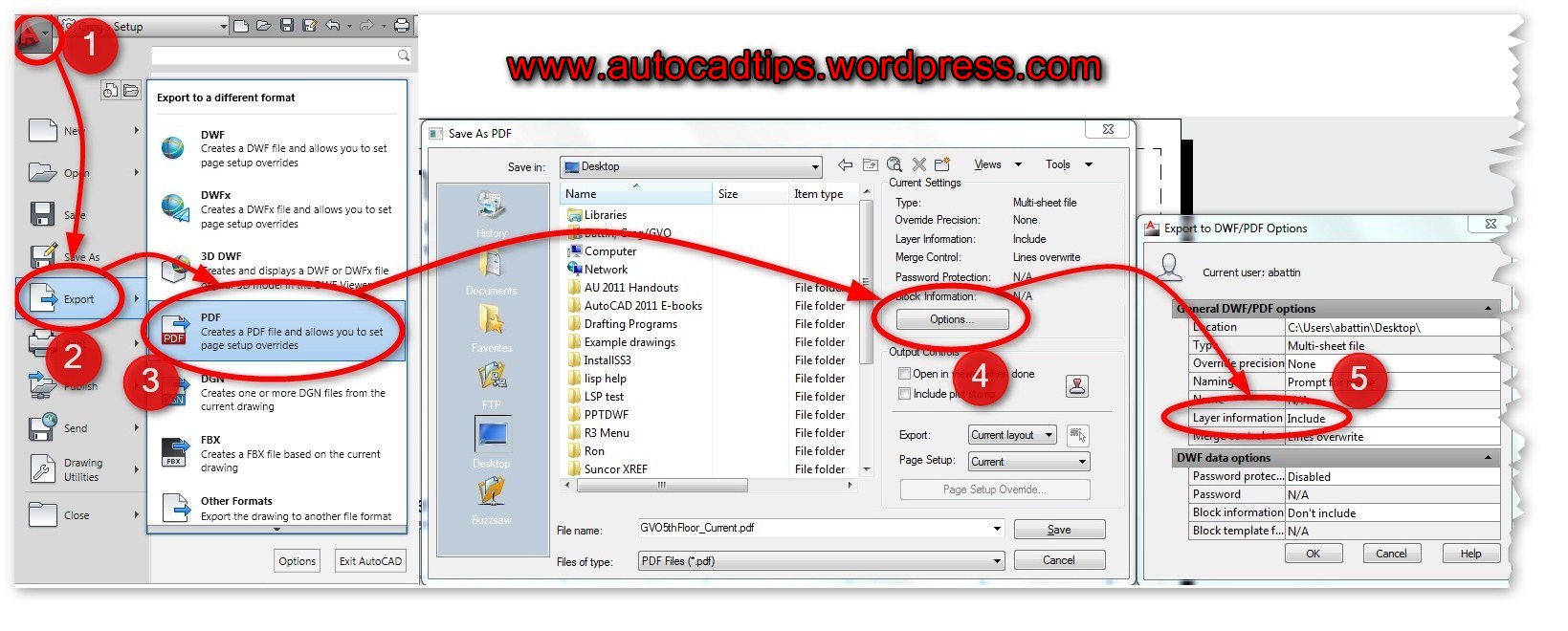
From the Export option:
  • Open the Application menu (Big red A)
  • Click “Export”
  • Select “PDF”
  • In the “Save as PDF” dialog: CLick the “Options” button
  • Switch the option that is next to “Layer Information” to “Include” or “Do not Include”
From the Output Tab: (quickest way)
  • Click the “Output” tab of the ribbon
  • Click on the “Export to DWF/PDF Options” button that is located in the “Export to DWF/PDF” panel
  • Switch the option that is next to “Layer Information” to “Include” or “Do not Include”

Tuesday, August 21, 2012

Start Windows Update with a clean restart of Windows

Start Windows Update with a clean restart of Windows

  1. Click the Start button Picture of the Start button, type msconfig in the search box, and then clickmsconfig.exe. Administrator permission required If you're prompted for an administrator password or confirmation, type the password or provide confirmation.
  2. On the General tab, click Selective startup, and then clear the Load startup items check box.
  3. Click Services, click Hide all Microsoft services, and then click Disable all.
  4. Click OK, and then click Restart.
  5. Open Windows Update by clicking the Start button Picture of the Start button. In the search box, typeUpdate, and then, in the list of results, click Windows Update.
  6. In the left pane, click Check for updates, and then wait while Windows looks for the latest updates for your computer.
  7. If any updates are found, click Install updates. Administrator permission required If you're prompted for an administrator password or confirmation, type the password or provide confirmation.
  8. Once updates are installed, restart your computer. Click the Start button, typemsconfig in the search box, and then click msconfig.exe. Administrator permission required If you're prompted for an administrator password or confirmation, type the password or provide confirmation.
  9. On the General tab, click Normal startup, click OK, and then click Restart.

Tuesday, July 17, 2012

AutoCAD Tips & Tricks: ANNOTATIVE TEXT

By setting  SELECTIONANNODISPLAY to 0, the multiple ghost images of the same text in the various multiple scales disappear leaving only the current scale visible.

Thursday, April 19, 2012

AutoCAD 2013 tip:


Wipeout frame

Wipeout frame has another setting. Now not only you can turn it on/off, you can also choose to show it on screen but they will not plot. You can change it from WIPEOUT command then choose F for frame, then select D for display but not plot.
wipeoutframe
You can also change it directly from WIPEOUTFRAME system variable. The result of available value is below.
ValueResult
0Frames are not displayed or plotted. Frames are temporarily displayed for object selection and selection preview.
1Frames are displayed and plotted
2Frames are displayed, but not plotted

Monday, April 2, 2012

AutoCAD 2013: whats new so far.....


AutoCAD 2013 System Requirements

Note that Windows Vista is not supported by Autodesk for AutoCAD 2013.

64-bit version
Operating System:
  • Service Pack 2 (SP2) or later of the following:
    • Microsoft Windows XP Professional
  • The following operating systems:
    • Microsoft Windows 7 Enterprise
    • Microsoft Windows 7 Ultimate
    • Microsoft Windows 7 Professional
    • Microsoft Windows 7 Home Premium
Hardware:
  • CPU
    • AMD Athlon 64 with SSE2 technology
    • AMD Opteron with SSE2 technology
    • Intel Xeon with Intel EM64T support and SSE2
    • Intel Pentium 4 with Intel EM64T support and SSE2 technology
  • Memory: 2 GB (4 GB recommended)
  • Disk: Installation requires 6 GB space
  • Display: 1,024 x 768 with true color (1,600 x 1,050 with true color recommended)
For both 32 & 64-bit Misc.
  • Browser: Internet Explorer 7.0 or later web browser
  • File Formats: (New file format in AutoCAD 2013):
    • Save-as Support AutoCAD R14, AutoCAD 2000, AutoCAD 2004, AutoCAD 2007, AutoCAD 2010, AutoCAD 2013.
    • DXF Support AutoCAD R12, AutoCAD 2000, AutoCAD 2004, AutoCAD 2007, AutoCAD 2010, AutoCAD 2013
  • API
    • LISP are compatible
    • Scripts are compatible
    • ObjectARX application will need to be recompiled
For both 32 & 64-bit using 3D modeling workflows:
  • Memory 4 GB RAM or more
  • 6 GB free hard disk available not including installation requirements
  • 1,280 x 1,024 True color video display adapter 128 MB or greater, Pixel Shader 3.0 or greater support by your graphics card, Direct3D capable workstation class graphics card.


Based on Google translation from Autodesk's Japanese site these are news in AutoCAD 2013:
  • Command-line options that you can click
  • Preview of property editing
  • Viewport preview of the changes
  • Extract the surface dividing line
  • Boundary stretching tool according to the situation
  • View and cross-sectional view detailed diagram
  • Strikethrough
  • Latest user templates
  • Read Inventor file
  • Autodesk Cloud connection
  • Social media connection
  • Customize synchronization and support files
  • Application of AutoCAD Autodesk Exchange

Command Line Enhancements

The command line has been enhanced. Color and transparency can be changed. It works better as undocked and can be made smaller. It features a semi-transparent prompt history that can display up to 50 lines.

Wipeout Frame

Control displaying but not plotting the wipeout frame with the new WIPEOUTFRAME system variable.

Friday, March 30, 2012

Thursday, March 29, 2012

AutoCAD 13

Finally got my hands on the latest AutoCAD v2013.
Thanks to my sponsor (who chooses to be anonymous).
So onward..to explore new commands.
Will keep you posted